In today's fast-paced development environment, effective team collaboration is the cornerstone of successful project delivery. Whether you're managing multiple jobs or developing notebooks, having a unified workspace where teams can collaborate seamlessly makes all the difference. This is where Yeedu Workspaces comes into play.
Yeedu Workspaces offers a dynamic, shared environment specifically designed to facilitate the development of jobs and notebooks while enabling teams to collaborate effectively in a collaborative data workspace. In this comprehensive guide, we'll explore the structure of Yeedu Workspaces, dive into its role-based permissions system, and discover how it simplifies team collaboration for modern data engineering workspace environments.
Yeedu Workspaces provides an integrated development environment where team members can work concurrently on projects, share insights, and collaborate seamlessly. Think of it as your team's collaborative hub for all data engineering and analytics activities within a multi-user data workspace.
The workspace acts as a container for related jobs and notebooks, providing teams with the tools they need for coding, debugging, and deploying applications. This centralized approach ensures that everyone on the team has access to the resources they need while maintaining proper access controls and organization.
When you navigate to the Workspaces section in Yeedu's navigation panel, you're greeted with a comprehensive dashboard that provides complete visibility into your workspaces and supports efficient spark workspace management across teams.
The dashboard displays critical information at a glance:
Workspace Identity and Metadata:

Resource Overview:
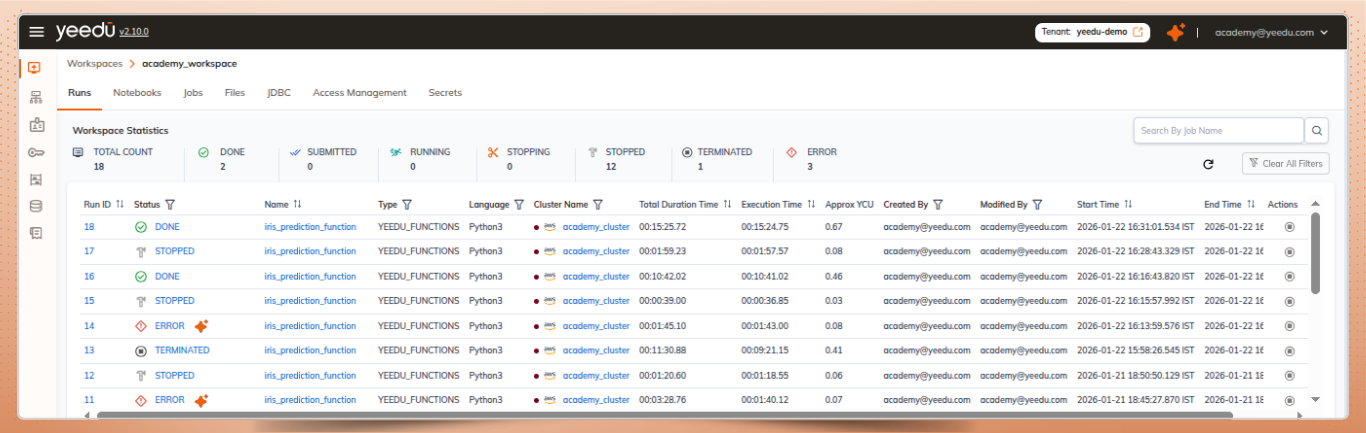
Quick Actions:
The Actions column provides immediate access to workspace access management functions, including the ability to edit workspace configurations and toggle between active and inactive states.
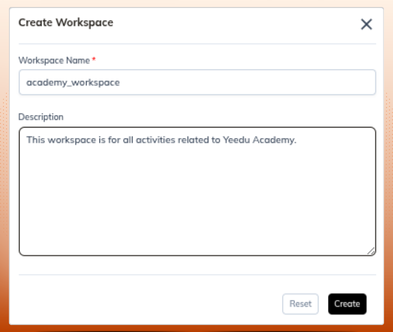
Setting up a new workspace in Yeedu is straightforward. The '+ Workspace' button on the dashboard opens a creation dialog where you can define your workspace parameters.
When naming your workspace, Yeedu enforces certain standards to maintain consistency across the platform and ensure compatibility across systems commonly used in data engineering workspace environments.
Workspace names must be in lowercase, can contain up to 64 characters, and may include hyphens, underscores, @ symbols, and periods. This naming convention ensures compatibility across different systems and APIs.
Additionally, you can provide an optional description to help team members understand the workspace's purpose, whether it's for production jobs, development notebooks, or a specific project initiative.
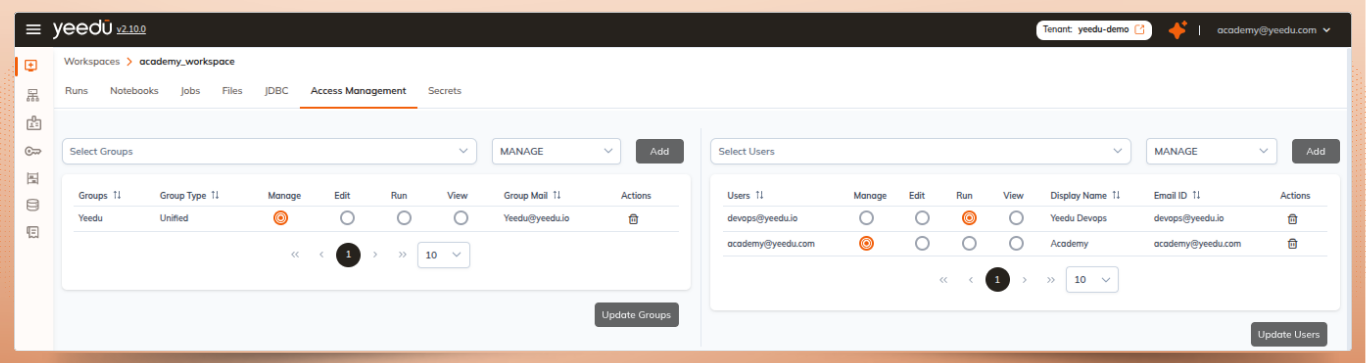
One of the most powerful features of Yeedu Workspaces is its granular permission system. Unlike simple read-write permissions, Yeedu implements a sophisticated role-based access control (RBAC) model with four distinct permission levels, making it well suited for role-based access control for data platforms.
Users with "Can View" permissions have the most restricted access level. They can read all job and notebook configurations and review run histories, making this permission level ideal for stakeholders, auditors, or team members who need visibility within a multi-user data workspace without operational control.
This ensures transparency while preventing accidental modifications to critical configurations.
Users at this level can read all configurations and run histories, start and stop executions, but cannot alter job or notebook settings, activate or deactivate resources, or participate in workspace access management.
This role is perfect for operators and testers who need to run existing jobs and notebooks without the ability to modify configurations. Users at this level can read all configurations and run histories, start and stop executions, but cannot alter job or notebook settings, activate or deactivate resources, or manage workspace access.
Users with "Can Edit" permissions have comprehensive control over workspace resources. They can create, update, activate, and deactivate jobs, notebooks, and workspaces themselves. This permission level is designed for developers and data engineers who are actively building and maintaining jobs and notebooks within a collaborative data workspace and notebook collaboration platform.
Editors can run and stop executions, read all configurations and histories, and manage the entire development lifecycle. However, they cannot manage workspace access permissions, ensuring that access control remains centralized.
The "Can Manage" permission level provides full administrative capabilities within a workspace. Managers inherit all capabilities from the Editor role while gaining exclusive access to workspace access management, allowing them to grant or revoke permissions for other users as part of role-based access control for data platforms.
This is the only role that can grant or revoke permissions for other users, making it ideal for team leads, project managers, and administrators who need complete control over who can access and modify workspace resources.
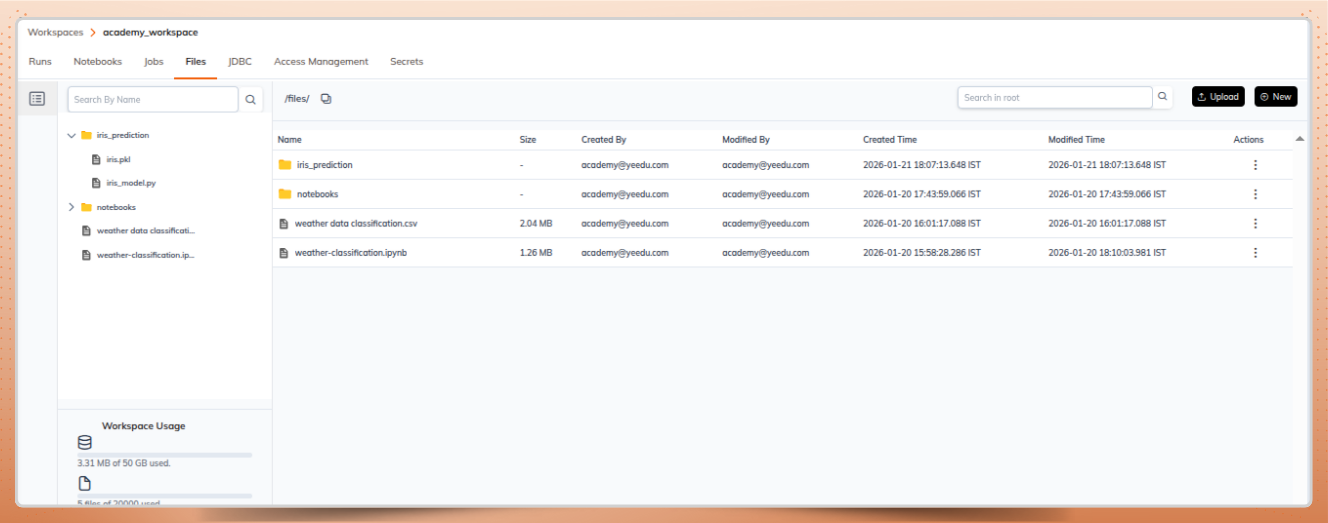
The Files in Workspaces feature allows teams to manage files without switching between different tools or interfaces, helping maintain productivity within a data engineering workspace. Users can upload files and folders from their local systems, create new files and folders directly in the UI, edit existing files with an integrated editor, and organize files with download, rename, move, and copy operations.
When working with files in your workspace, you have access to a comprehensive action menu for each file and folder. You can download individual files or entire folders (which are automatically compressed into zip format for convenience), rename files inline for quick organization, move files between folders within the workspace, and create copies for versioning or template purposes.
These file management capabilities integrate seamlessly with job execution and notebook operations, meaning files stored in your workspace can be directly referenced and used in your jobs and analysis notebooks.
Instead of scattering jobs and notebooks across different locations, Yeedu Workspaces brings everything together in one organized environment. Teams can quickly locate resources, understand dependencies, and maintain consistency across projects.
The workspace structure naturally encourages organization by project, team, or environment (development, staging, production), helping teams maintain efficient spark workspace management.
With creator and modifier tracking built into every workspace, there's always a clear audit trail. Teams can easily identify who created a workspace, who last modified it, and when changes were made. This transparency is crucial for collaborative environments where multiple team members contribute to the same projects.
The four-tier permission system allows organizations to implement collaboration models that match their operational needs. You might have senior engineers with "Can Manage" permissions overseeing workspace access management, developers with "Can Edit" permissions developing and managing spark jobs and notebooks, operators with "Can Run" permissions executing jobs, and stakeholders with "Can View" permissions monitoring progress and results within a multi-user data workspace.
Multiple team members can work within the same workspace simultaneously without stepping on each other's toes. Whether developers are building new notebooks, operators are running jobs, or managers are reviewing configurations, everyone can collaborate effectively within their permission boundaries.
By integrating file management, job development, and notebook creation in a single workspace, Yeedu eliminates context switching and improves visibility into compute usage, an important capability for teams practicing FinOps for Spark environments.
Developers can upload Python scripts, create notebooks to test them, configure jobs to run them in production, and manage all related files without leaving the workspace interface.
To maximize the benefits of Yeedu Workspaces, consider these organizational strategies:
Structure by Purpose: Structure by Purpose: Create separate workspaces for different environments (development, testing, production) or different projects to maintain clear boundaries in your spark workspace management strategy.
Leverage Permission Levels: Assign the minimum necessary permissions to each user following best practices for role-based access control for data platforms.
Use Descriptive Names and Descriptions: Take advantage of the description field to document workspace purposes, ownership, and any special considerations. Future team members will thank you for the clarity.
Maintain Active Status Hygiene: Use the activate/deactivate feature to clearly indicate which workspaces are currently in use and which are archived or deprecated. This prevents confusion and reduces clutter in your workspace list.
Organize Files Thoughtfully: Use the folder structure within workspaces to organize related files together. Group scripts, configuration files, and data files in logical directories that match your project structure.
Yeedu Workspaces represents a thoughtfully designed collaboration platform that addresses the real challenges data teams face when working together on complex projects. By combining a clear organizational structure, granular role-based permissions, and integrated file management, it creates an environment where teams can collaborate effectively without sacrificing security or control.
The four-tier permission system ensures that every team member has exactly the access they need, while the centralized workspace structure keeps resources organized and accessible within a collaborative data workspace. Whether you're a solo developer organizing your own projects or managing a large team with diverse roles and responsibilities, Yeedu Workspaces provides the flexibility and control you need to succeed.
As data teams continue to grow in size and complexity, tools like Yeedu Workspaces that prioritize collaboration, security, and usability become increasingly valuable for organizations operating modern data engineering workspace environments.
By understanding and leveraging the structure, roles, and permissions of Yeedu Workspaces, teams can focus less on access management and more on delivering value through their spark jobs and analytics notebooks.